| dbList Readme |
|
'---------------------------------------------------------------------------------------- '- ASP dbList - Version 8.1 - 30 July 2005 '- Copyright © 2005 - Livio Siri (http://www.livio.net) - All Rights Reserved. '---------------------------------------------------------------------------------------- Database grid with records edit, delete, add, search, filter and export to excel, database and table selection, page navigation, field sort and search in page. This application fills a sortable, pageable html table with records from a database. Features: database and table selection, records edit, delete, add, export, filter and search. Works with MS Access, MSSQL and MySQL databases. 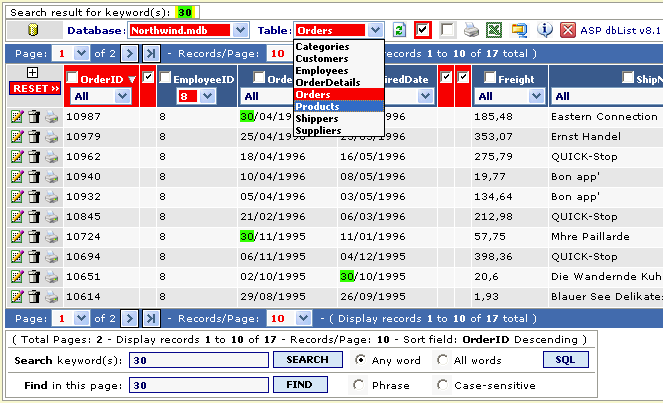 INSTALLATION: -- extract and save in the root of your site with full path info. -- open the file "_config.asp" and edit the configuration details according to your preferences. -- copy the line <!-- #include virtual="/dblist/_config.asp" --> into the ASP page where you want to show the database grid. CONFIGURATION tips: You should specify paths for dbList files and images REFERED to the ASP file where you call the dblist application: Example 1 remotePath = Server.Mappath("/database") & "\" strIncPath = "/dblist/" strimgDir = "/dblist/images/" the paths tree is as follow: Root |_____ yourincludefile.asp |_____/dblist/ (dbList files) |_____/dblist/images/ (dbList images) |_____/database/ (yourdatabase.mdb) Example 2 remotePath = "C:\inetpub\databases\" strIncPath = "../dblist/" strimgDir = "../dblist/images/" the paths tree is as follow: Root |_____ /yoursitefilesdir/yourincludefile.asp |_____/dblist/ (dbList files) |_____/dblist/images/ (dbList images) C:\inetpub\databases\ (yourdatabase.mdb) In the example 2 the database file is outside the Root dir of your HTTP web site. If the database is under your Root dir, as in the example 1, you can either define the path with: remotePath = "C:\inetpub\wwwroot\yourdomain\database\" (physical path) remotePath = Server.Mappath("/database") & "\" (virtual path) NOTE: the database dir should have write permission on server to add, edit and delete records. The zip file contains a full functional example with two Access test databases TO DO: -- SUGGESTIONS ARE WELCOME !!! -- Script rating on Aspin, Hotscripts and Planet-Source-Code are welcome !!! REVISION HISTORY: V 8.1: (thanks to users suggestions) -- fixed "800a0bcd" error when trying to add a new record to an empty table -- fixed wrong LCID date format, MM/DD/YYYY - DD/MM/YYYY -- added replacement statement for <br> to VbCrLf in the grid memo fields -- added checkboxes toggle selection to show/hide unwanted columns name and content -- added checkbox toggle selection to show field description insthead of field name (Access only) -- added procedure access control with password protection system (Username=admin, Password=pass) -- added report print feature for all filtered records -- added single record report print feature -- added database compact utility (Access only) -- added toggle display of field type in the add/edit window -- changed user input SQL query command layout -- some minor bugs fixed V 7.9: (thanks to users suggestions) -- fixed overflow bug of memo fields on the dropdown selection -- added support for MSSQL and MySQL database types -- added selection between databases from a given folder (Access only) -- added database and table dropdown selection -- added configurable default field sort either ascending or descending -- added configurable display of field type in the add/edit window -- added user input SQL query command, SQL command debug window, with show/hide toggle -- changed display method of search result when "no record found" -- improved method for search and highlight words in page -- improved method for search by column combined with search keyword(s) -- enhanced method for memo-textarea add/edit with the aid of an expanded text edit window -- X image showed in place of excluded Binary field types content -- sorting inhibited on excluded fields type -- some minor bugs fixed V 7.2: modified _config.asp, _dblist_72.asp and readme files. -- added the capability tho hide the first column (normally the primary key field) -- added the capability tho display the column description in place of the column name (the column description should be edited in the database file:) 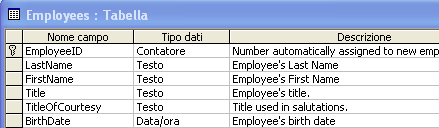 V 7.0: First release That's it! Easy, enjoy! '--------------------------------------------------------------------------------------- '- This script is free OpenSource; you can modify (at your own risk) any part of it '- and use it both privately and commercially. '- '- This script is distributed in the hope that it will be useful, '- but WITHOUT ANY WARRANTY; without even the implied warranty of '- MERCHANTABILITY, FITNESS FOR A PARTICULAR PURPOSE OR ANY OTHER '- WARRANTIES WHETHER EXPRESSED OR IMPLIED. '- '- You may use parts of this script in your own private work, but you may NOT pass '- the whole or any part of it off as your own work. This program is freeware. '- You may distribute it freely provided that all the copyright notices remain untouched '- in the scripts and the outputted HTML. '- '- I have spent many unpaid hours in development and support this and other scripts '- available for free from Livio.net. If you like using this script then please help support '- the development and update of this and future scripts by a small donation. All scripts '- published remain free and you may still use them as much as you like both privately and '- commercially, the donation is only a request to help me cover some of the costs involved. '- '- Should you make any improvements to this script, please be kind enough to let me '- know so that i may improve mine for the rest of the people who use it. Thanks. '- '- You can ask for more info or post support questions at: - http://www.livio.net '--------------------------------------------------------------------------------------- |